What Are SERPs?
A plain-English guide for business owners who want to understand — and dominate — the most valuable real estate on the internet.
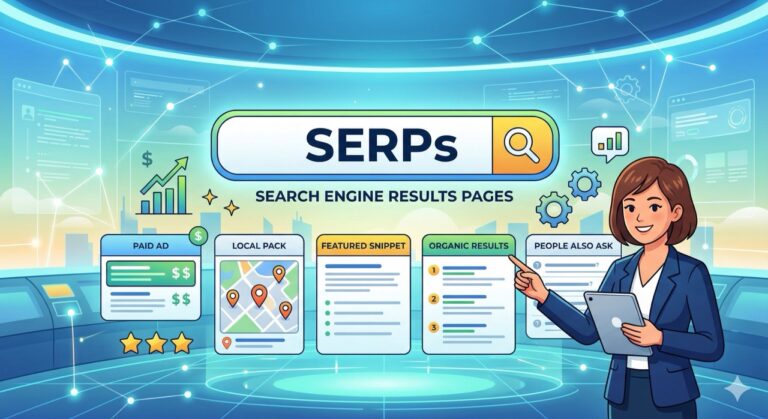
In the world of digital marketing, SERPs stands for
Search Engine Results Pages.
Simply put, the SERPs is the page you see after you type a query into Google, Bing, or another search engine. Every time a potential customer searches for your service, a SERPs appears — and your business is either on it, or it isn’t.
DEFINITION
SERPs — the results page displayed by a search engine in response to a user’s query. It’s the most competitive and most valuable digital real estate in existence. It’s the battlefield where you compete for your customers’ attention.
90%
of users never click to page two of results
Page 1
is where visibility, trust, and clicks live
Why SERPs Matter to Your Business
It’s no longer just about being “Number 1” in the list of blue links. Modern search results are dynamic. If your business doesn’t appear on the first page of the SERPs, you are effectively invisible to the 90% of users who never click through to page two
Key Features of Modern SERPs
When you search for your services, you’ll see far more than just website links. Search engines deploy SERPs Features to provide immediate answers — each one is an opportunity for your business.
Paid Results (PPC)
These appear at the very top and bottom, labeled as "Sponsored." You pay for this placement via Google Ads. Fast visibility — ideal for high-intent, immediate leads.
Organic Results
The "natural" listings are earned through Search Engine Optimization (SEO). These take time to build but deliver compounding, long-term traffic without paying per click.
Local Pack (Map Pack)
A map showing three local businesses — crucial for "near me" searches. This is prime territory for service-area businesses and directly tied to your Google Business Profile.
Featured Snippets
A box at the very top that answers a question directly — sometimes called "Position Zero." Appearing here positions your brand as the definitive authority on a topic.
People Also Ask (PAA)
A list of related questions that expand when clicked. Each PAA box is an opportunity to capture users earlier in their research journey — before they've made a decision.
Knowledge Panel
A detailed info box on the right side of the screen, common for brand names. It signals authority and trust — Google is essentially vouching for your business's legitimacy.
How to Improve Your Business's SERPs Presence
Dominating the SERPs isn’t a one-trick play. It requires a coordinated, multi-pronged strategy — each pillar reinforcing the others.
Search Engine Optimization (SEO)
Optimizing your content, site structure, and technical foundation so Google rewards you with higher organic rankings — building traffic that compounds over time.
Content Authority
Creating deep, genuinely helpful content that Google wants to feature in snippets. When you answer questions better than anyone else, you earn Position Zero.
Local SEO
Optimizing your Google Business Profile, building reviews, and strengthening local signals so you show up in the Local Pack when customers search nearby.
Structured Data (Schema Markup)
Adding backend code that helps search engines display your pricing, star ratings, FAQs, and more directly on the SERPs — standing out before a user even clicks.
Frequently Asked Questions
SEO (Search Engine Optimization) is the process — the work you do to improve your website, content, and authority. The SERP (Search Engine Results Page) is the result — the location where your website ultimately appears. Think of SEO as the training and the SERP as the scoreboard.
No. SERPs are highly personalized based on the user’s physical location, search history, and device type (mobile vs. desktop). This is why local SEO matters so much — someone searching “dentist near me” in Carlsbad will see completely different results than someone in Los Angeles.
To land in the snippet, your content should provide a clear, concise answer to a specific question — usually in 40–50 words — near the top of your page. Structure matters: use headers to frame the question and follow immediately with the answer. Structured data (schema markup) also helps signal to Google that your content is answer-worthy.
Looking to Take Over the SERPs?
Understanding the terminology is just the start. Find out exactly where your business stands and how to climb the rankings.